
For Public Calendar Admins: Share Your Events with a Simple Code!
Scan the code on a poster or flyer with your phone, and you can instantly view the date, time, and details of the event. If you use the TimeTree app, you can also save the event directly to your own calendar!
We hope you'll find this useful for promoting your events, live shows, and more!
How to Get Your Code
You can get the code from the event details screen of any Public Calendar.
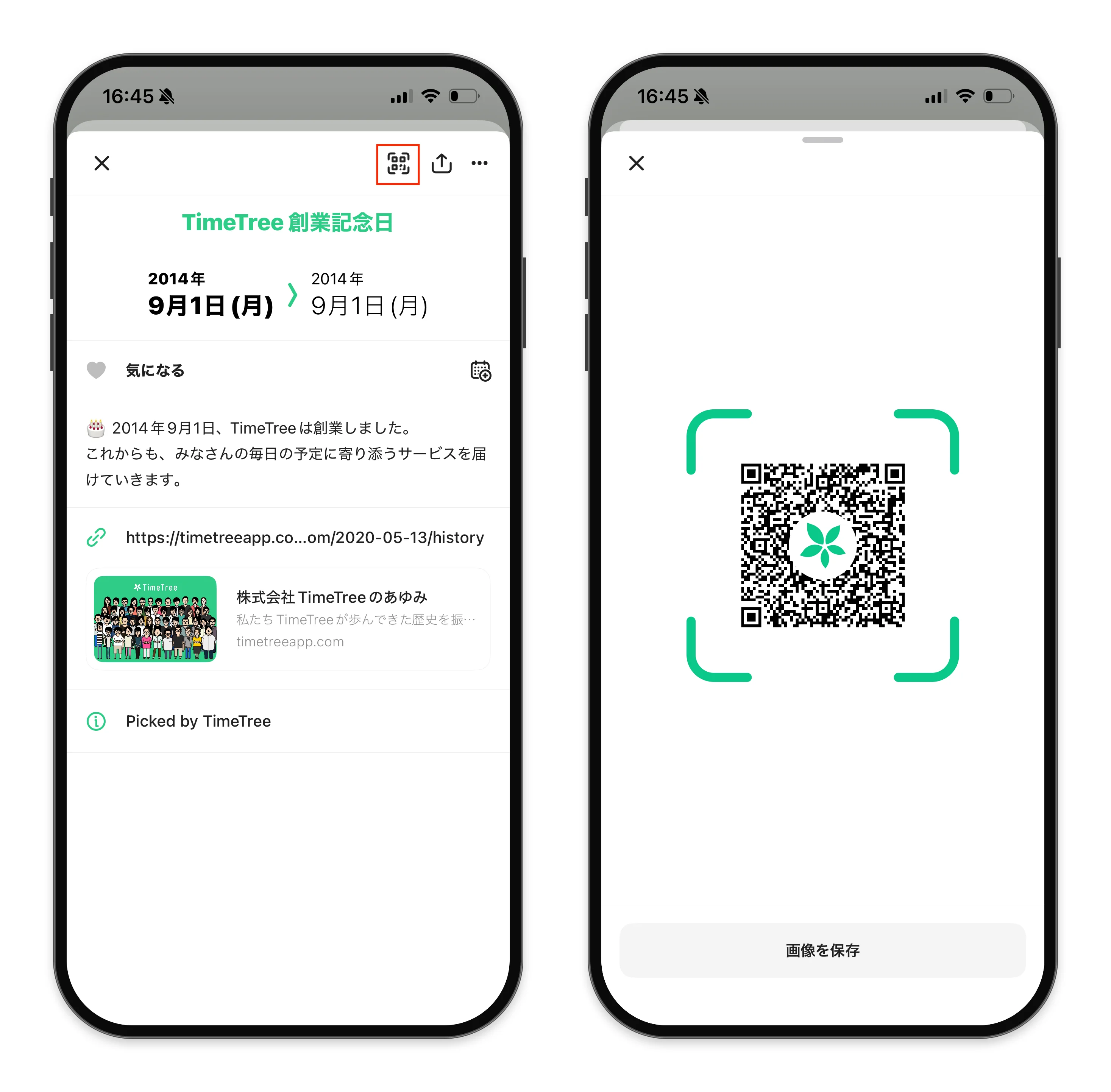
Open the details screen of the event you want to share.
Tap the code icon in the top right corner of the screen.
Tap "Save Image" to save the code image to your device.
The saved code image is high-resolution, making it perfect for printed materials like posters and flyers.
Important Notes
Codes can be retrieved not only by the public calendar administrators but also by anyone viewing the event.
You can retrieve the code in advance even if the event is still scheduled for future publication. Once the event is published, the code will direct users to the event details.
Even people who do not have the TimeTree app can view event details on the web via the code. To save the event to a TimeTree calendar, the TimeTree app must be installed. App users can save it by selecting "Add this event to calendar."
We encourage you to use codes for your upcoming event announcements! If you have any questions, please feel free to contact us here.